

The new version of Locus Map adds support for Android Auto, a feature the community has long requested! From now on, you can use your favorite navigation app on the dashboard of a car or motorcycle that supports Google’s Android Auto. And there are other exciting features as well.
What you can look forward to:
- Android Auto
- Photos and videos taken during the track recording
- New chart display system
- A more intuitive selection of routing profiles
Android Auto
With Android Auto, you can launch a mobile app from your phone onto the dashboard of a supported vehicle or third-party device—whether it’s a car or a motorcycle. In this case, the app features a customized interface designed for easier and safer use by the driver.

With the new version of Locus Map, if you have Premium Gold, you can see your favorite map on the car’s screen as soon as you start the app.
What can it do?
Maps of your choice
You can now display any map you have in Locus Map on your car’s dashboard. Whether it’s our LoMaps in online or offline versions, road maps, hiking maps, satellite maps, or maps from your favorite publisher.
The map is automatically selected based on your phone’s settings, though you can override this setting directly in Android Auto. You can center the map, zoom in and out, and enable or disable rotation. For best results, we recommend choosing the offline version of LoMap. Not only will this ensure that you can see the map while driving, even if you lose signal, but these maps also support rotating place names on the map to match the direction of travel.
The map refresh rate is now determined by the location update frequency. In practice, this means one map refresh per second during active navigation. We are working on ways to make the display smoother.
In navigation mode, Locus Map automatically applies the “Auto” preset and reverts the settings to their original state when navigation ends. So, if you want to customize the automatic map zoom settings based on speed, locate the corresponding “Auto” preset in Locus Map on your mobile phone.
By default, the app automatically switches between light and dark modes based on the lighting conditions provided by the vehicle. If this behavior is undesirable for your use, you can configure it differently. In dark mode, the map is currently rendered as an inversion of the light mode. In some cases, the result may not be ideal. However, we plan to release a dedicated LoMap dark theme in the future.

You can also display your custom waypoints on the map, a feature that geocaching enthusiasts—for whom Locus Map was originally created—will particularly appreciate. You can view caches, open a window with their basic information, and start turn-by-turn navigation to them. Hunting for “drive-ins” will now be a breeze. Similarly, you can also display your planned routes on the map.
Another available layer over the map consists of auxiliary graphic elements that technically minded users will appreciate—these include time and distance circles, azimuth and direction lines, and dynamic elevation data that appears near the cursor.
And if you really want to go all out, you can overlay a map on top of the base map on the car’s display—for example, using cadastral data from our WMS/WMTS library. There are no limits to our imagination—you know how it is ;).
Search
Searching for a destination is an integral part of the basic features. Locus Map performs full-text searches for both points of interest (gas stations, restaurants, accommodation, campgrounds…) and mailing addresses. When stationary, you can use the keyboard or voice control via the vehicle’s audio system to enter your search; while driving, for safety reasons, only voice control is available. The search history is identical to the history in the mobile app, so if you search for your destination on your phone in advance, all you need to do in the car is click on search and select the location from the autocomplete suggestions. You can then immediately start turn-by-turn navigation to the searched locations.
Navigation
The app can navigate to a selected destination, but also along a route that you plan in advance using the route planner in the mobile app or on the website.
There are several ways to select a destination. As we mentioned earlier, you can choose a custom waypoint, such as a geocache. You can search for a location or address. And you can also simply tap directly on the map to create a destination. Locus Map will fill in the address automatically.
Locus Map offers two route calculation modes – fast and economy. The fast route connects the start and destination so that you spend as little time as possible on the journey. The fuel-efficient mode ensures that you save as much fuel as possible, thereby also helping the environment. The app remembers your last selection and automatically confirms the route after 5 seconds the next time you start navigation.
Simultaneous use on your phone and Android Auto
Locus Map has one more trick up its sleeve. You can control it simultaneously on both the vehicle’s display and your smartphone. What’s the point of this? For example, you can use your smartphone to dynamically change the navigation content or destination and control certain features that aren’t available via the vehicle’s screen, for example, track recording.
Summary
Locus Map was never developed exclusively as a road navigation app. And we don’t plan on changing that. But if its features suit your needs in this regard, why look for another app for car or motorcycle trips? Besides, we know how annoying it is to switch to a different navigation app once you’ve already found your location in LoMap.
We’re curious to see how many of you will now use Locus Map for things like commuting to work by car. 🙂 If something doesn’t work as expected or if you find that certain features are missing, we’d love to hear your feedback!
Browse photos and videos from your trip
Everyone takes lots of photos and videos on their trips. Locus Map has long been able to display them over the map, but this time we’ve added the option to keep them all neatly organized right next to a specific track. They appear directly below the map with the track.

You can click on the photos to view them in detail:

Photo display is turned off by default. You can turn it on in Settings > Points and Routes > Show Media. When you launch the app, don’t forget to grant Locus Map access to your media. And rest assured—your photos and videos are processed exclusively within the app and never leave your mobile device.
Detailed charts
The track graphs have been thoroughly updated. You can now set two curves on either the distance or time axis directly in the route details panel. You can choose from elevation, slope, speed, pace, heart rate, and other parameters.
Tap a point on the graph to display the corresponding location on the track. This allows you to scroll through the track smoothly.

You can click on a button next to the main graph to view more detailed information, which displays all available route parameters in separate graphs. The graphs are linked. You can zoom in and out as desired and view real-time values at a selected point along the track.

Simpler router settings
Selecting profiles for route planning in the route planner was a bit of a design challenge for us, but with the latest update, we firmly believe we’ve simplified and streamlined the process while retaining all customization options. And there’s something extra on top of that, but more on that later.
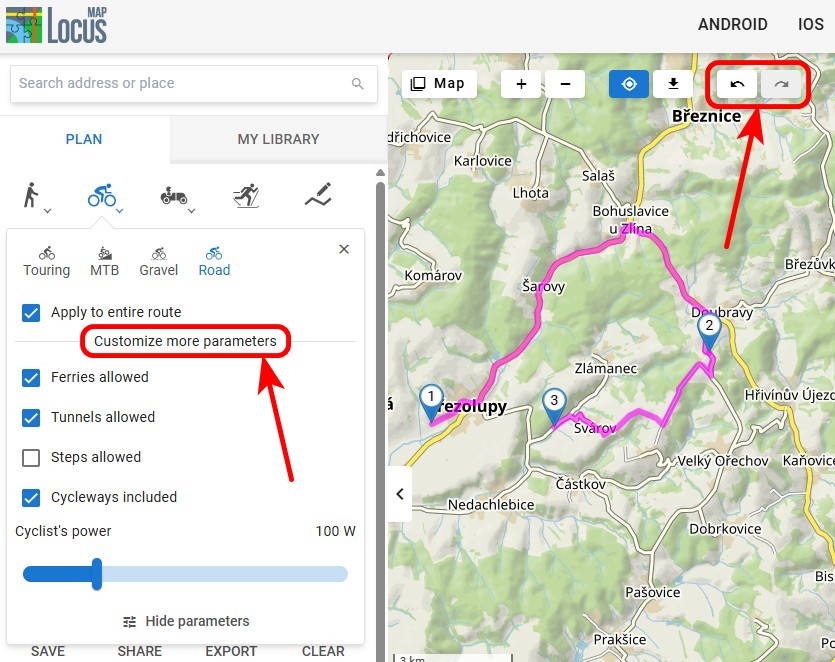
The entire route or just the next section?
This decision is now much simpler—just check or uncheck the “Entire Route” option at the bottom of the route profile selection. Then select the appropriate profile by tapping its name, and you can continue planning:

Custom settings
It’s located right below the button next to the profile name:

If you’re in the middle of planning a route and want to change your settings, you can use them to recalculate both the next section and the entire route.
Full compatibility with BRouter profiles
Geek alert! For many of our die-hard fans, the profile customization options offered by the app aren’t enough. That’s why we’ve fully integrated Locus Map with the capabilities of the specialized route-planning software BRouter. This allows for truly detailed configuration of routing profiles.
You can import external profiles into Locus Maps as BRF files (currently only via the system file manager, but we’re working on direct import as well). In the profile list, create a new profile, select the appropriate external file, and start tweaking the settings:

The possibilities are truly endless, so tech-savvy people can really let their creativity run wild.
Spring is in full swing, so head outside and try out all those new features! We can’t wait to hear what you think of them in the comments.
androidAndroid AutobrouterElevation chartGraphsphotosrouting profilesVideos
27 Comments
Hallo und danke für dieses von mir lange gewünschte Funktion.
Es funktioniert hervorragend.
Würde mich freuen wenn die Ausrichtung im Stand der Fahrzeugaufbereitung entspricht oder es explizit darauf eingestellt werden kann.
Super 👍 Beste all in one App.
Für Ideen könnt ihr mich gerne kontaktieren
Thanks, Volker, for your support!
"Tap a point on the graph to display the corresponding position on the track. This allows you to scroll smoothly through the track."
Unfortunately, this doesn’t work if you’ve enabled photo view. In that case, you can only access the graphs by hiding the map. It would be better to display the photos below the graphs or to be able to hide the photos in the individual track view if necessary.
Otherwise, I’m delighted with this update again!!!
Hi Helmut, yes, this UX glitch will be resolved.
Amazing update, Locus Maps is so underrated, it is without a doubt the best and most customisable navigation app, I've used it for international travel when off-roading on my motorbike and will be using it again in May when I visit Georgia (the country).
Thanks for your support! Enjoy your travels with Locus Map!
Mis à jour avec de nouvelles fonctionnalités très intéressantes
"L'affichage des photos est désactivé par défaut. Vous pouvez l'activer dans Paramètres > Points et itinéraires > Afficher les médias."
Suggestion: mettre un raccourci pour activer l'affichage des photos dans la barre d'outils se trouvant en bas d'un itinéraire au lieu de revenir dans Paramètres > Points et itinéraires > Afficher les médias.
Hi Patrick, thanks for your interesting idea. We'll definitely think about improving the UX of the attached track photos.
Bonjour, il n'y a pas de profil pour CAVALIERS et cela est très dommage, en effet très peu d'applications le propose. Pourriez vous y pensez ?
Hi Sabine, non-motorized activities have always been our focus no.1, but now with Android Auto available, we'll definitely think also about more options for riders.
The best mapping app ever! I'm using locus maps for bush walking and the level of functionality that is in the app is beyond many of the "leading edge" PC applications. Love it so much!!
Could be mentioned that Android Auto only works with gold subscription.
Hi Joachim, this information is included in the article: "With the new version of Locus Map, if you have Premium Gold, you can see your favorite map on the car’s screen as soon as you start the app."
Thanks, Will, for your support. Enjoy!
Habe die Version 4.33 und die Funktion Medien aktivieren eingeschaltet. Allerdings ändert sich in der Darstellung der Fotos nichts. Ich muss wie vorher ein Foto auf der Karte anklicken um es anschauen zu können.
In bekomme keine Übersicht meiner Fotos zu einem Track.
Übrigens ist im Handbuch die Funktion auch noch nicht beschrieben.
Hi Andreas, please contact us with the issue on https://help.locusmap.eu so that we can tackle it individually. Thanks.
The user manual is yet to be updated.
Hallo! Nach wie vor die beste App.
Ich habe jedoch immer Probleme mit dem GPS. Bei der Trackkaufzeichnung bleibt der Standpunkt stehen und die Aufzeichnung stoppt. Teilweise wird ein Standpunkt (Kilometer entfernt) erkannt und dort bleibt die Aufzeichnung stehen.
Alle Tipps um LOCUS aktiv zu halten und vom Stromaparen auszusparen wurden berücksichtigt.
Gibt es unter Android 16 einen Workaround um das Problem abzustellen?
Ich bitte um eure Hilfe!
Vielen Dank im voraus und viele Grüße
Peter
Hi Peter, please try turning off the Google Services-assisted in settings > GPS. For more help, please contact us at https://help.locusmap.eu. Thanks.
The map completely disappeared from the application in my Chrome browser.
Hi Gabor, please make sure you use the latest version of the web browser. Some older versions are not able to display the maps. For more help, please contact us at https://help.locusmap.eu.
Hey Luxus locus :o)
Mir gefällt es, dass man nun durch das Höhendiagramm scrollen kann und direkt auf der Karte sieht, wo das ist, weil der Positionszeiger mit läuft.
Dickes Lob!
Noch offene Wünsche wären von meiner Seite:
1) Die Steigung mittels Farbe der Linie anzeigen (Linie ist grün=flach, gelb=mittel, rot=steil). Farbe=Natürlich ein gleitender Mittelwert.
2) die Diagramme
2a) für die vertikale Achse zoombar machen
2b) oder: statt Zoom die vertikale Achse einstellbar machen
2c) für das HöhenDiagramm, das zusammen mit der Karte angezeigt wird, die horizontale Achse zoombar machen
3) Eine Legende für die Karten in der App speichern und anzeigen (jede Karte ist anders!)
Legende online bringt nix, wenn man kein Netz hat
Hi Herwig,
thanks for your interesting ideas. We'll include them in our next considerations about improving the charts.
Hallo Locus- Team, ihr habt eine unglaublich leistungsfähige App für Profis und Spezialisten. Laien wie ich werden niemals auch nur die Hälfte aller Funktionen benutzen können, es ist viel viel zu kompliziert. Bis es startet, hat man 5x Google Maps aufgerufen. Lästige Einstellungen kann ich nicht ändern, bei Gerätewechsel verliere ich die meisten Einstellungen und Karten. Vielleicht gibt es einen Volkshochschul- Kurs um alles zu lernen?? Nun soll ich auf eine neue Version umsteigen, die noch wesentlich mehr leistet? Lasst euch nicht entmutigen und
Viele Grüße vom Dumm- User
HI Michael, if you need help, please have a look at https://docs.locusmap.app or contact us at https://help.locusmap.eu. We'll do our best to give advice.
Hello. This will be the first time I'll be critical of your decision. Every single app I use, be it YouTube, Spotify or anything else have android auto functionality enabled for free. You had to lock it behind a subscription. May I remind you that android auto itself is free, embedded functionality of android os, and trying to monetize it is really low. I always supported you, even during the locus classic debacle, so I ask you-revert your decision and put android auto functionality in the free, basic app. Don't lock behind any kind of payment, because to my knowledge there is no other app on the market doing it, which makes you look really bad.
Hi Maciek,
Thanks for your feedback, we appreciate critical ones just as positive. We don’t plan to revert our decision of allowing access to our AA integration only to Gold users now.
Core focus of Locus Map application lies quite far from this functionality, rendering this feature as bonus in the set of other abilities our app primarily offers. Additionally, there are significant costs on our side behind delivering this feature. (Just release phase took more than one year negotiating with Google not including development!) I would like to remind here that we are proud to follow our strategy of not allow to monetize on users’ behavioral or geolocation data, which is opposite of business models behind majority of “free” services in nowadays Internet.
Those aspects didn’t give us much room to even consider variant mentioned in your request (but we did anyway) as our focus, outside of joy with trying to make Locus Map even better, must include also strategy of sustainability for our team behind it. So in the end we must let you decide whether you would like to join community of our Gold Premium users enjoying everything we have in the offer, be happy with our core set of features in Silver Premium or don’t mind to be limited with our free tier or with our now obsolete Classic version.
BTW, even on my personal Android Auto dashboard I have several other apps requiring me to purchase in order to use them, so we definitely don’t consider ourselves as pioneers in this regard.
Locus for Android is the best map app for outdoor activites by a lot. The iOs version on the other hand is not even a shadow of it's android sister.
In it's current state it's not even worth a look, because it has not a single feature that makes it stand out against other map apps.
Is there any public road map for the iOS Version? I asked this 2 weeks ago in the forum, no answer.
I dont expect exact dates, just a "within next quarter we want feature X and till end of the year feature Y".
Idk, at least something that keeps my hopes up? I'm an iOs gold "user" for over a year now (was an android user gold user before that), although i don't use the app right now, just to support you. (I'm not mad at you, it was my own decision but i'm nontheless disappointed).