
We haven’t been in touch since the release of the previous version of Locus Map for Android – we’ve been busy working. But now it’s time to show off the fruits of our tireless labor. November brings several major new features across all platforms, where you can use Locus Map – on the web, iOS, and, of course, Android. And finally, a little Christmas surprise :).
What’s new on the website?
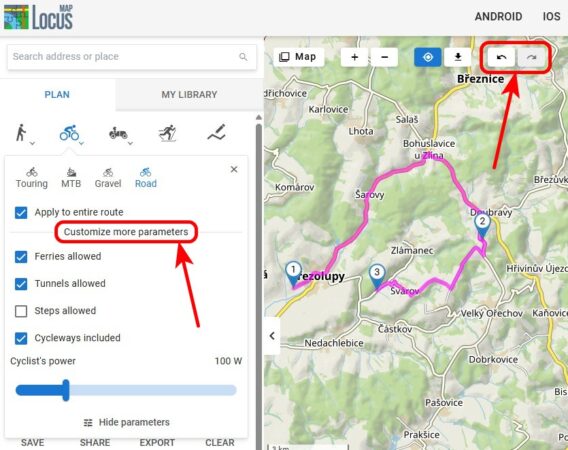
Our web application with a route planner and library has once again moved closer to its Android counterpart in terms of functionality. The planner now includes options for custom routing profile settings, undo/redo buttons, and the ability to include these settings when sharing a planned route.
“Custom” parameters for route calculation
You are already familiar with the options for customizing various parameters for route calculation from the Android version of the app. Now they are all available on the web as well:
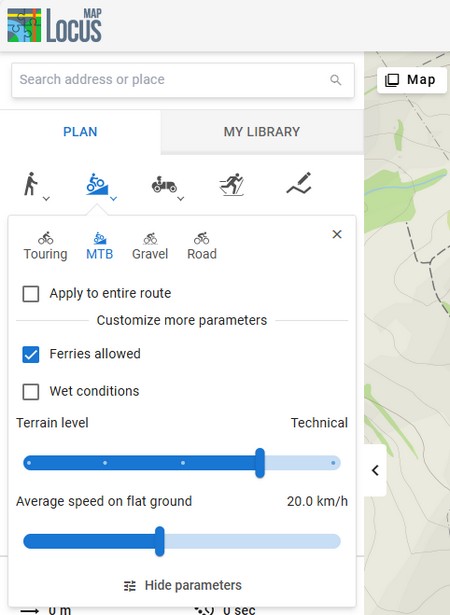
- For walking routes, you can set your walking speed to refine the estimated time for the route. You can also add the option “wet conditions.”
- There is much more to cycling routes, as each type of bike has its own specific requirements. For mountain bikes, in addition to the flat-surface speed, you can also set the difficulty of the terrain, while for road cyclists, you can set the power in watts or disable the preference for cycle paths. Everyone will welcome the option to enable shortcuts via stairs, tunnels, or ferries.
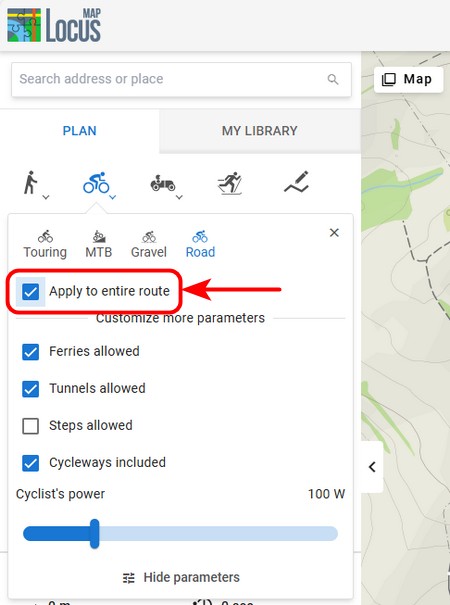
You can apply your own settings to individual segments of the route or to the entire route at once. Just check the appropriate option:
Undo/redo buttons for full control over planning
We have all been eagerly awaiting these buttons, and we have finally managed to resolve this technical issue. By clicking on “undo”, you can return to the individual steps of your planning, including changes, route point shifts, etc. With the “redo” button, you can repeat the steps you have returned from.
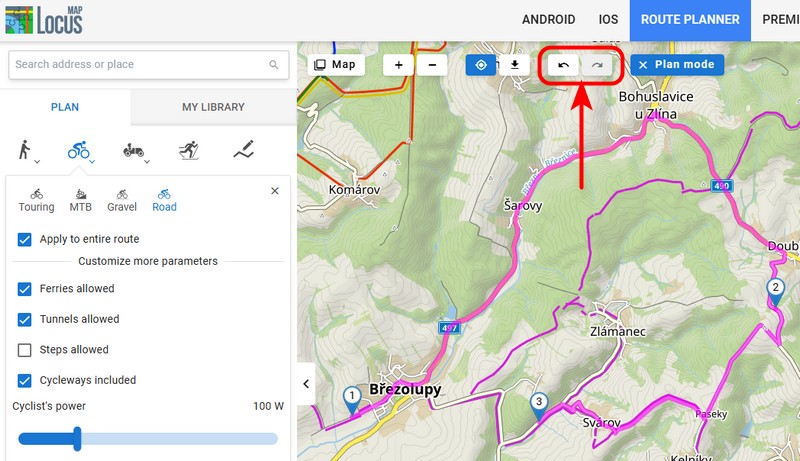
The “back” button in your browser’s toolbar now works similarly, but it can also reverse all other actions you have performed on the page, including map panning and zooming.
Sharing your planned route
The option to share your planned route using a URL link has been available for some time. However, sharing now also reflects the custom route settings and offers two ways to copy the link:
- using the “Share” button with a shortened link
- directly from the browser address bar – this means, among other things, that you will not lose your work in progress, e.g., when restarting the browser
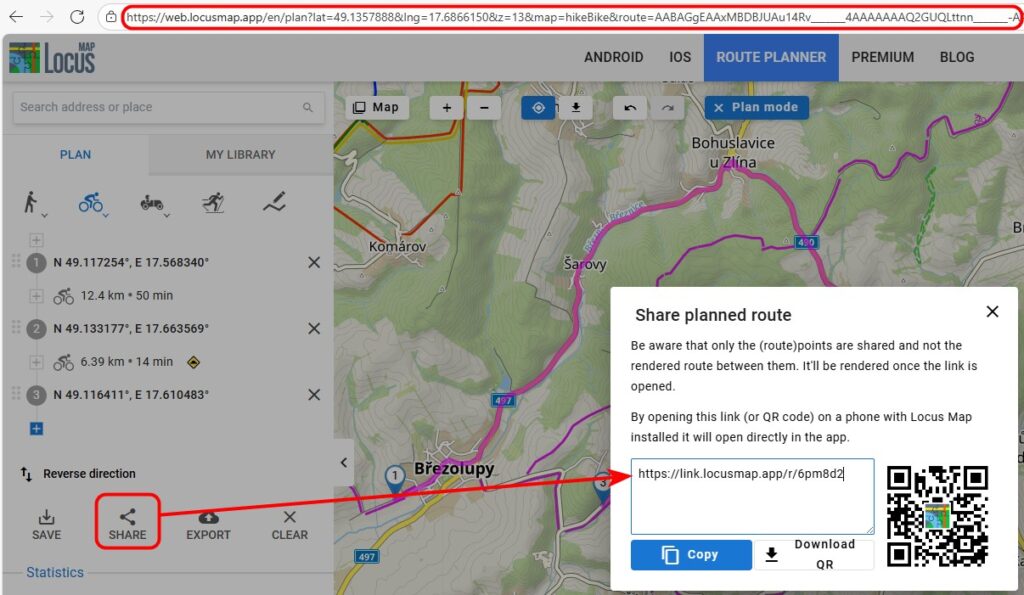
What do you think of the new user interface of the planning panel? We are aware that we have tried to cram a lot of functionality into a small space. We are constantly trying to balance the fine line between simplicity and the range of features. Please let us know in the comments if you find it intuitive and pleasant to use.
Bulk actions in My Library
We have also expanded the library management options for your tracks, routes, and points. You can now view, copy, move, export, and delete multiple items at once.
First, turn on multiple selection mode. Then check the routes and points you want to perform further actions on:
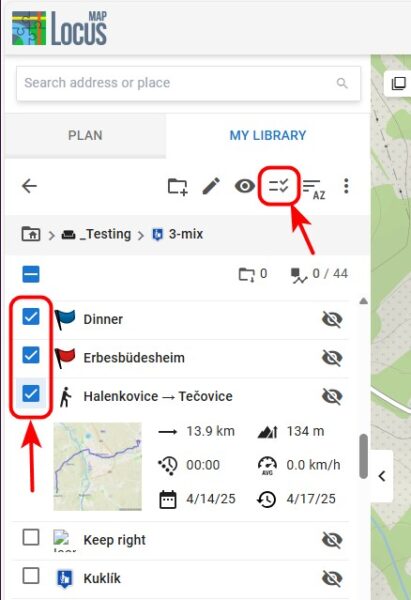
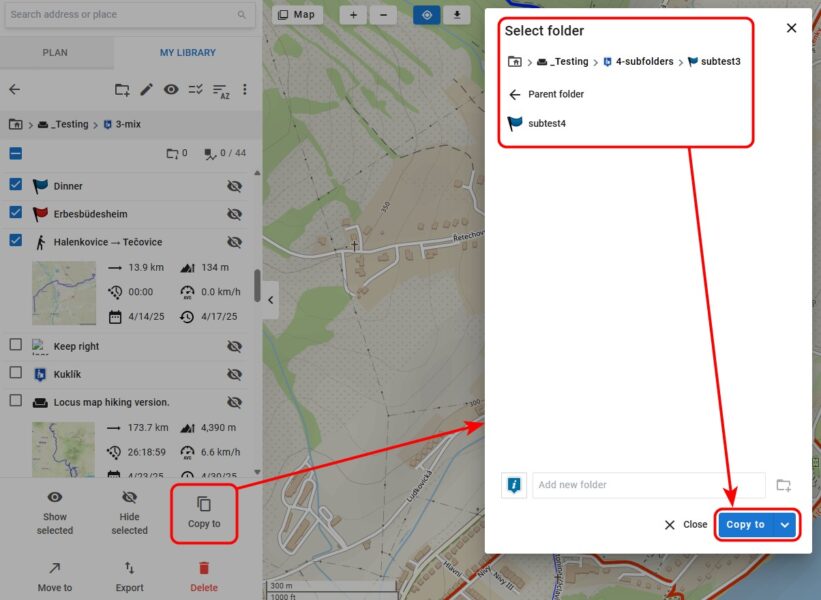
Select from the menu of actions. Before copying or moving items, select the destination folder:
New version for iOS
Locus Map’s younger sibling, Locus Map Lite, which we are developing for iPhones and iPads, has also gained some key new features:
Guidance to the target
The guidance displays a straight line from your location to the specified destination. It is therefore ideal for guidance in open terrain, such as to a cache. Of course, you can also navigate to points of interest on the map (known as LoPoints) or to your own points.
To start guidance, tap the button in the bottom bar of the point details:
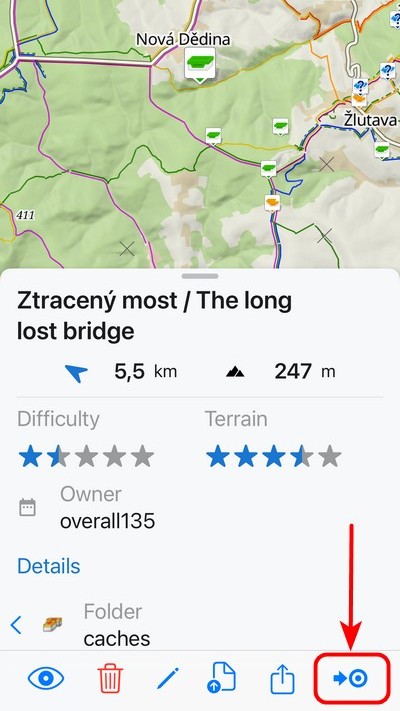
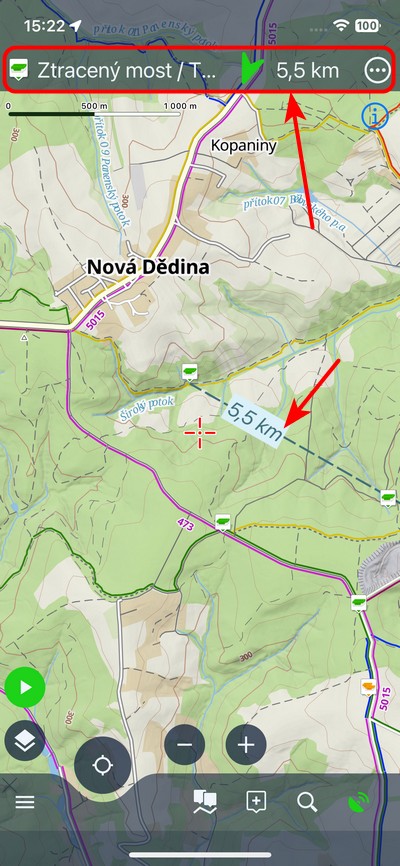
The top of the display shows a panel with the name of the waypoint, a compass needle, and the distance as the crow flies:
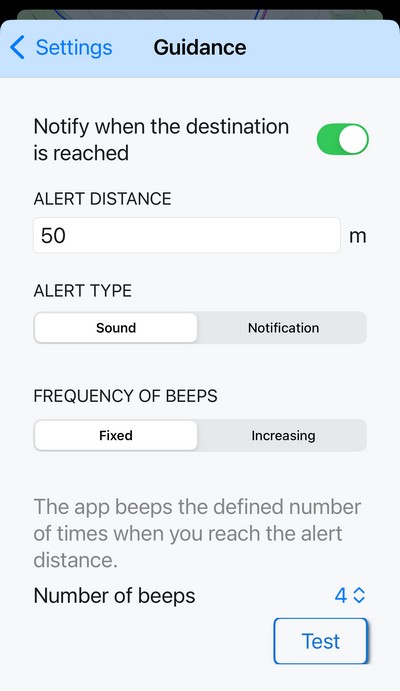
It also includes a notification system that alerts you when you are within a certain distance of your destination – you can choose between a beep or a system notification. You can, of course, customize this distance. Cachers will also appreciate the beeping alert with increasing frequency – the beeping speeds up as you approach the target (or slows down as you move away):
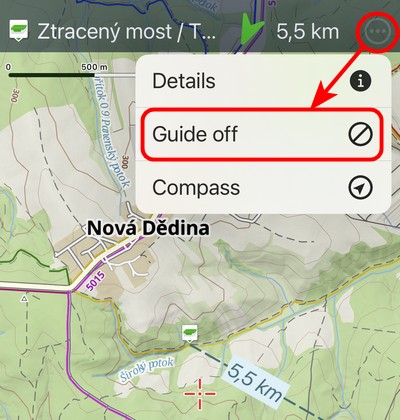
You can end guidance by tapping the button in the guidance menu in the top bar:
Temporary point with a long press
When you hold your finger on any place on the map, a temporary point is created with coordinates, aerial distance, and postal address:
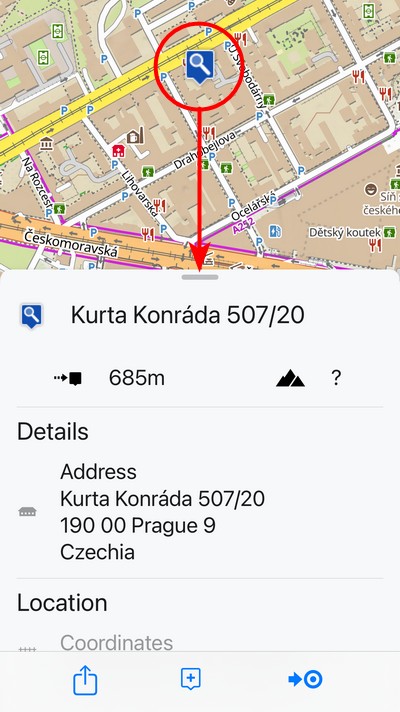
You can perform several actions with the temporary point:
- In its place, you can create a permanent point and save it to your library.
- You can share its location using a link, display it in another map application, or launch external navigation to it.
- You can start guidance on it, see above
When you swipe away the panel with details about the point, the point disappears.
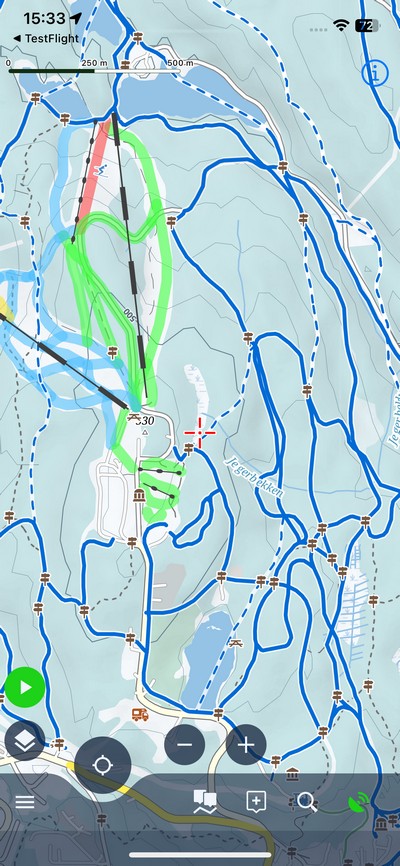
Winter vector map
Winter is approaching, so we have added a vector map for winter sports to the app. It includes ski slopes with color-coded difficulty ratings, ski lifts, cable cars, and marked cross-country skiing trails. It now also supports text rotation to maintain readability, just like its summer alternative:
Compass and GPS status
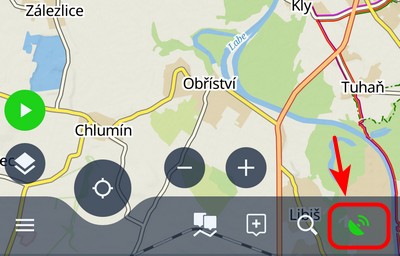
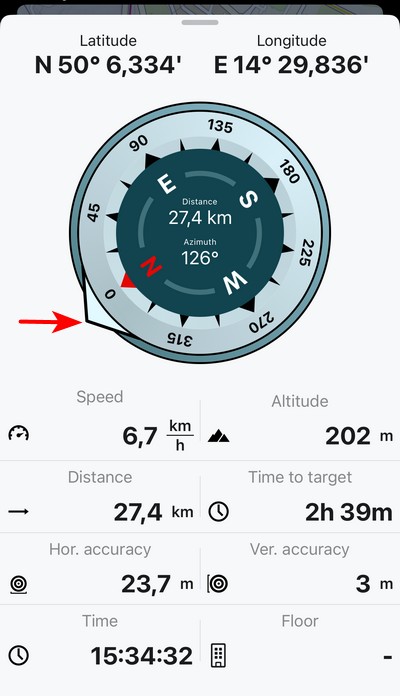
Every navigation app has a screen with a compass and information about the GPS status of your phone. In Locus Map Lite, you can now display it by tapping the GPS signal indicator:
The compass also includes an accurate azimuth. Furthermore, the screen displays information about your current altitude, coordinates, speed, and horizontal and vertical GPS accuracy.
When target guidance is activated, the compass displays an arrow pointing toward the target:
New Locus Map 4.32
We have also released a new version for Android. Unfortunately, we have not yet been able to get it onto Google Play due to a technical issue on their part. Unfortunately, communication with user support at Google for Developers is incredibly poor, so the official release date for the new version is nowhere in sight.
If you don’t want to wait for it, you can download it from our Repository.
A complete summary of news can be found on our Helpdesk.
The Garmin add-on supports the latest watches
We have also updated the Garmin watch add-on, Locus Map for Garmin. We have made it available for a whole range of new models.
Make your loved ones happy
Christmas is fast approaching once again, and if you’re thinking about gifts for your loved ones, we have a tip for you – a 20% Christmas discount on Premium Silver and Gold annual vouchers!
You can purchase discounted vouchers on our website www.locusmap.app/voucher until January 15th, 2026. The vouchers have no expiration date, so they can be redeemed at any time.
androiddata managementguidanceiOSMy librarynew releasepointstracksweb
50 Comments
Thank you for your continued work!
Could you please allow us to search for tracks in the web application?
Thank you
Hi, searching for tracks in the Library is on our road plan.
Nice release notes. Appreciating the details and screenshots. Keep it up!
Thank you!
Thank you for the detailed and well-written release notes. I hope the deployment issue to Google Play gets resolved soon.
We hope so too... It's already been quite a nightmare.
Optimizando esta grandiosa app, qué buen trabajo. Keep it up.
Please fix the sync of media at the photopoints, It's very useful for guiding and finding locations, especially when we want to locate nests for our monitoring work. We greatly appreciate the application.
Hi, if you have any issue with the app, please contact us at help.locusmap.eu and give us as many details as possible so that we can simulate the issue and fix it. Thanks
Hi, media sync is huge task in our priority list, so keep your finger crossed for next year!
Est ce que je peux faire un revelé topographique sur locus , pourque les lignes du coupes de niveau soient tracés, puis estceque je peux les importer sur autocad
Hi, Locus Map is an app for hikers or bikers. If you need an app for professional usage, please try Locus GIS (https://play.google.com/store/apps/details?id=menion.android.locus.gis)
Thank you for the amazing app, I use it all the time for Enduro motorbike riding
That's great, thank you!
Thanks very much. Was able to update via a Google Drive File rather than Google Play. I was told that this update would fix the problem with 'Geotagged Media', a feature I use often. Although, there is no mention of it in the notes and it is not working after the update. Is there any information about this? Thank you.
We are trying to investigate the issue as it can't be reproduced on all devices. Sorry for the inconvenience.
It would be nice if longer routes could be calculated. Unfortunately, this is not possible yet.
Hi Markus, how long routes would you like to calculate?
Thx s lot ... 2nd time my wish: a Parameter (set) for route planning to support camper. So to set a) height b) weight c) width. A real advantage to Google Maps (so far, perhaps they work also on this feature).
FYI, OsmAnd allows to do these configurations, so it may serve as a workaround until Locus offers this feature
Assume it wold be mainly limitation on map side of things. You can integrate it in planer but if maps are missing this info, you create false sense of security or can't plan anything.
Sorry, but we are not planning to add any car-related features at the moment. Locus Map is primarily an outdoor navigation app for hiking, mountain biking or geocaching. Thanks for understanding.
Ich nutze Locusmaps vor allem für die Routenplanung. Kürzlich bin ich auf einen Fehler gestoßen, wo der Planer einen Weg ignoriert.
Anders als etwa bei anderen Anbietern, weiß ich nicht,wohin ich den Fehler melden könnnte.
Zuerst mal in OSM kontrollieren, ob der Weg auch richtig erfasst (getaggt) ist. Kann ich gerne machen, wenn Du mir die GPS Koordinaten des Weges gibst.
Wenn der Weg in der Karte richtig erfasst ist (s.o.) kannst du bspw. in https://help.locusmap.eu/ schauen, ob eines der existierenden deinen Fall abdeckt, sonst ein neues auf machen.
Hi, if you have any issues with Locus Map, please contact us at help.locusmap.eu or locus.map@asamm.com. All contacts are at the Google Play page or our homepage www.locusmap.app.
Thank you for this great project! I have been using Locus for years, and it's getting better and better.
Since your normal gold plan is already a real bargain I don't quite understand the Christmas discount. Anyways, who does not have premium plan yet, should subscribe now.
Thanks Heiko for your support! Merry Christmas!
Using LM for years and it is getting better and better. Many thanks for your continuing development especially for really practise funktions and not all the KI/AI, SocialMedia, Graphics etc. features as at many (or All?) other Apps. Perfect development & work!
In the German version of this post, "Anleitung" is used but not suitable — users will expect a manual 🙃. Better use "Luftlinie" or "Zielführung" as the android app does 🙂
Ah sorry, the AI probably didn't catch the meaning correctly. It's been fixed. Thanks for the notice.
v plánovaní (Zimní) by bolo vhodne pridať "turistika na lyžiach" (skitouring) mimo vyznačených lyžiarskych trás
Na neznačených trasách můžete využít jiné profily, třeba pěší nebo ruční režim.
Great work. Thanks for all the effort and the amaizing app.
Thanks!
Dear Locus Team
Thank you for the continuous development of the app. I think the app is really great and use it in my work as a rescue dog handler at REDOG. The app has never let me down at work, even in difficult, inaccessible terrain. Merry Christmas
Hi Oli, and do you know that we support S&R organizations with free Premium licenses? If not, please have a look at https://www.locusmap.app/support-for-search-and-rescue/ for more information.
Thank you and merry Christmas!
I'm still waiting for locus app to support the polygon. I'm badly need it.
Hi, Locus Map is an app for hikers or bikers and as such will never support work with polygons. If you need an app for professional usage, please try Locus GIS (https://play.google.com/store/apps/details?id=menion.android.locus.gis)
Pri plánovaní trasy vo web aplikácii mi nefunguje aktualizácia údajov o parametroch trasy (vzdialenosť, sklon, atď.) v nadväznosti na pridávané body trasy. Kde je prosím problém?
Dobrý den, pokud máte jakýkoliv problém, nahlaste nám jej prosím na podporu na https://help.locusmap.eu. Přiložte podrobný postup, jak chybu reprodukovat, popř. screenshoty a videa. Děkujeme
Hello, great job! Thank you very much. The bottons Back and Forth are the best! I like the multiple selection, but it doesn't work on the ditectory book yet. and not even in the Android app. If you succeed in the next version you will be great!
Hi, please contact us at https://help.locusmap.eu and describe in detail what exactly doesn't work. Thanks!
Ahoj, přidávají se dny z voucheru za aktuální předplatné nebo přes něj? Mám předplaceno přes google play do konce března (opakující se platba) a k Vánocům dostal voucher na gold. Děkuji za zprávu. Viktor
Dobrý den, aplikujte prosím voucher až po vypršení stávajícího předplatného. Voucher a předplatné bohužel nelze kombinovat. Voucher nemá časové omezení.
Hello . How can I share an hole map with several routs as gpx files ?
Hi, you can share multiple routes in a GPX file but not a map.
Pourquoi dans Locus Android auto lors de chercher une destination, le contact avec l'Internet s'arrête et je dois redémarrer l'auto ??
Hi, we are sorry for any inconvenience. If you encounter any issues with the app, please contact us at https://help.locusmap.eu and provide a detailed description of the problem. We'll be happy to help.